
Bot Detection
Shipped: Agent Identity & Human Trust Layer
WebDecoy now verifies AI agents with Web Bot Auth (RFC 9421), catches agent impersonation, and grades human trust on clearance tokens: everything that shipped.
bot-detectionSee which AI crawlers proved who they are, which pages AI assistants fetched for real people, and how many visitors each AI product sent back.
Every GEO tool will tell you how visible you are in AI answers. Very few can tell you which AI engines actually read your site, and none of them can tell you whether the crawler that read it was real.
That gap matters more than it sounds. So we built the other half: what happens on your side of the conversation, proven rather than claimed.
Most GEO products measure the answer side. They run prompts through ChatGPT, Perplexity and Gemini and record whether your brand shows up. It is useful, and it is noisy. When SparkToro ran about 3,000 prompts, fewer than 1 in 100 runs returned the same list of brands, and fewer than 1 in 1,000 returned them in the same order.
The tools that look at your traffic instead count crawler hits by User-Agent, sometimes checked against published IP ranges. A User-Agent is a string anyone can type. Watch any public site for a week and you will find requests that claim to be a well-known AI crawler and fail the proof. The forged “ChatGPT-User” requests we see are not reading blog posts. They ask for files like /.env, /api/.env and /.well-known/jwks.json.
A dashboard that counts those as AI engines reading your content is not measuring AI visibility. It is measuring who is willing to lie about being ChatGPT.
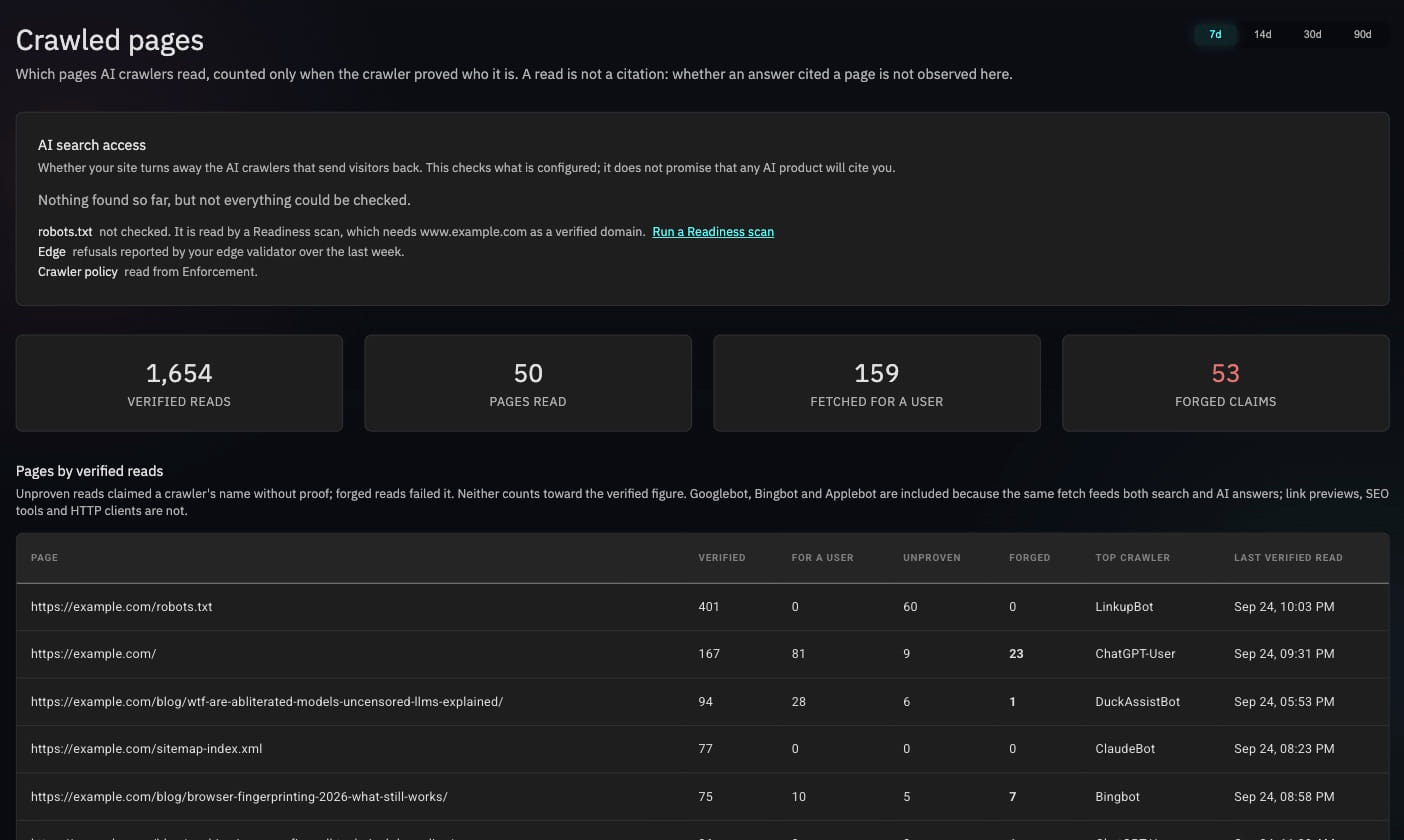
Crawled pages now answers one question: which AI engines read this page, and did they prove it?
Every page shows its reads in three columns:
Pages are ranked by verified reads, not raw hits, and only AI crawlers are counted. Googlebot, Bingbot and Applebot are included because the same fetch feeds both search and AI answers; link previews, SEO tools and HTTP clients are not.
History is kept as a daily rollup of bot traffic only, so the trend survives after detailed logs age out. Look back 7, 14, 30 or 90 days.
Most AI crawling is bulk: training crawlers and search indexers working through your sitemap. A smaller kind is worth more. When someone asks ChatGPT, Claude or Perplexity about something and the assistant fetches your page live to answer, the request comes from ChatGPT-User, Claude-User or Perplexity-User.
WebDecoy now logs every one of those fetches, with the page, the assistant and whether its identity checked out. It is the closest honest signal that an AI answer used your page.
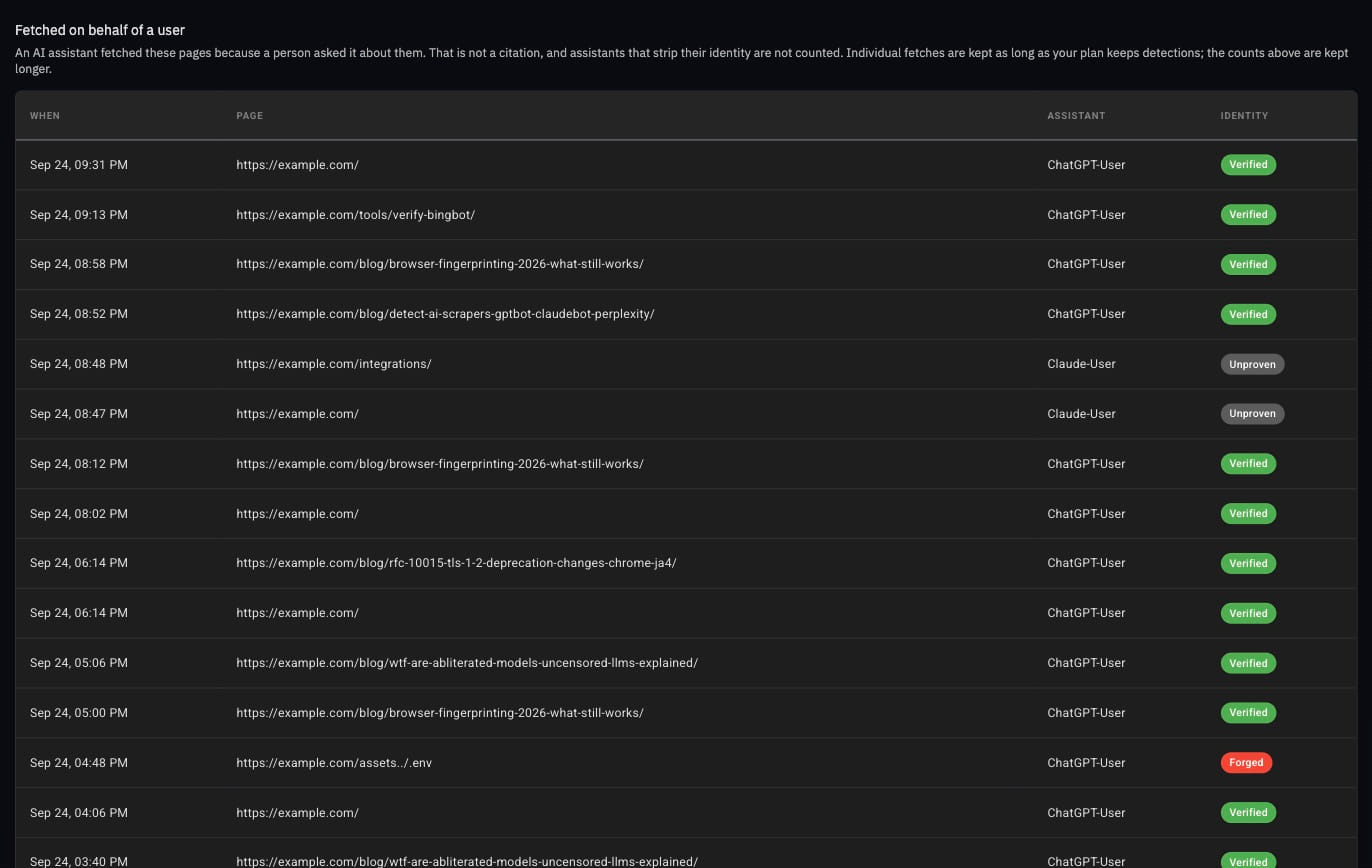
Look at the forged row. Something claiming to be ChatGPT asked for an .env file. Counted by User-Agent alone, that would be one more “AI read” on your dashboard.
We are careful about what we call it. It is a fetch, not a citation. Your server can see that an assistant read the page because a person asked; it cannot see what the answer said. Anyone who tells you otherwise from server logs is guessing.
This is the one that costs sites traffic without anyone noticing.
Security layers are getting aggressive about AI crawlers, often for good reasons. Cloudflare now blocks AI agent and training crawlers by default on new domains’ ad-monetized pages. WordPress security plugins block unfamiliar bots. A robots.txt written to keep out training crawlers can easily catch OAI-SearchBot or PerplexityBot too, and those are the crawlers that put you in AI search results.
The AI search access check looks at three things for every crawler whose operator sends visitors back (OpenAI, Anthropic, Perplexity, Google, Microsoft and others):
Refusing training crawlers is never flagged. That is a choice, and a reasonable one. Refusing the crawlers that send you visitors is usually an accident, and the fix is one policy change away.
The other side of the exchange is what AI products send back. The Crawl-to-Referral Ratio compares, per AI company, how much it crawled with how many visitors it sent.
That ratio used to undercount referrals, and we would rather say so than hide it. It counted only AI visitors who also looked automated, so a site with real ChatGPT visitors could see “sent nothing back”. That is fixed. Every visit an AI product sends is now counted, by the page tag, the Cloudflare or Netlify edge sensor, the WordPress plugin or the Node SDK. When a site runs more than one of them, each day’s figure comes from the most complete one, so no visit is counted twice.
What is stored is a count: the AI product, the landing page’s path and a number. No IP address, user agent, cookie, session, query string or full referrer. There is no row per visitor.
Put next to Crawled pages, you get the whole loop per page: which AI engines read it, which assistants fetched it for a person, and how many visitors each AI product sent to it.
We do not track prompts, and we do not promise citations or rankings. No study has shown that llms.txt, Content Signals or any robots.txt directive gets you cited more often. Ahrefs found that 97% of published llms.txt files got no requests at all, and most of the few requests came from SEO tools rather than AI engines.
What we do promise is evidence: which AI engines really read you, which ones you are accidentally turning away, and what they sent back. Visibility you can prove is a better starting point than visibility you have to estimate.
Everything above is live on the AI Traffic and Crawled pages screens for every WebDecoy site.
npm install @webdecoy/node@0.17. AI referral counting is on by default with an API key.Start free and see which AI engines are reading your site, and which ones are only pretending to.
Prompt trackers run questions through ChatGPT, Perplexity and others and record whether you appear. That tells you about a sample of answers, and the samples are noisy. WebDecoy measures your side: which AI crawlers fetched which pages, whether each one proved its identity, which pages AI assistants fetched live for a person, and how many visitors each AI product sent. Those are observed, not sampled.
The crawler proved who it is: a Web Bot Auth signature, an IP address inside the operator's published ranges, forward-confirmed reverse DNS, or Cloudflare's verified-bot category. A request that only claims a crawler's name in its User-Agent is shown as unproven, and one that fails the proof is shown as forged. Only verified reads count toward the headline.
No, and we do not call it one. When ChatGPT-User, Claude-User or Perplexity-User fetches a page, an assistant read that page because a person asked about it. That is the closest honest signal that an answer used your page, but whether the answer cited you is not something your server can observe.
No. Each visit an AI product sends adds one to a count for that product and the landing page's path. No IP address, user agent, cookie, session, query string or full referrer is stored, and there is no row per visitor.
Crawler reads come from any server-side sensor: the Cloudflare edge sensor, the Netlify extension, the WordPress plugin, the Node SDK and Vercel log drains. AI referrals are counted by the page tag, the Cloudflare and Netlify edge sensors, WordPress plugin 2.10 and @webdecoy/node 0.17. When a site runs more than one, each visit is counted once.
WebDecoy now verifies AI agents with Web Bot Auth (RFC 9421), catches agent impersonation, and grades human trust on clearance tokens: everything that shipped.
bot-detectionTurn bot detections into an investigation: see likely targets, repeat visits, and crawl breadth, with the requests behind every observed pattern.
bot-detectionMost of FCaptcha v1.28–v1.34 protects the visitor who did nothing wrong: expired tabs, sparse mouse traces, invisible mode. Plus one breaking change.
bot-detectionLike this post? Share it with your friends!
Get a personalized demo from our team.